Understanding Activity Consumption in SAP S/4HANA
In SAP S/4HANA, materials, and activities are treated similarly, especially in the actual costing cockpit. Today, let’s focus on activity consumption analysis, the equivalent of material price analysis.
1. CKM3A:
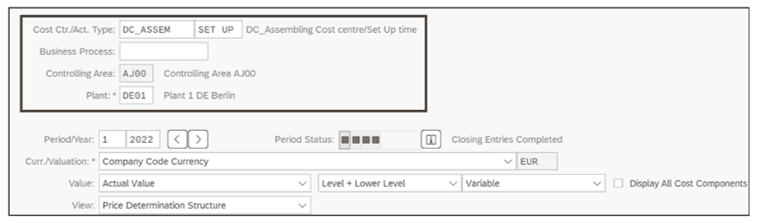
- In SAP S/4HANA, activities have their analysis in Transaction CKM3A.
- Header fields include Cost Ctr./Act: type, Business Process, and Controlling Area.
2. Price Determination View:
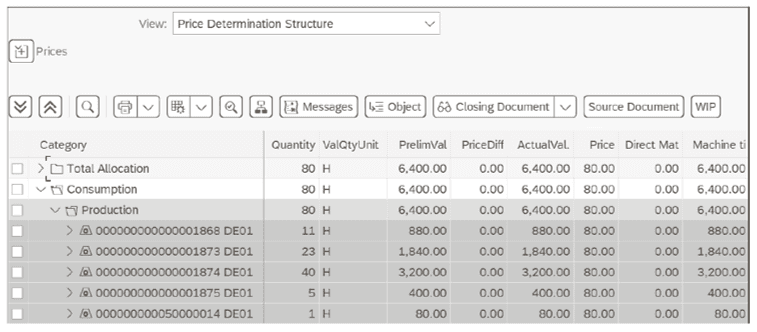
- Similar to material price analysis, the price determination structure shows quantity, preliminary value, price difference, actual value, and price.
- Rows detail Total Allocation and Consumption.
3. Total Allocation:
- Illustrates the total allocated activity quantity for the period.
- Example: 80 hours of activity type 1 with a preliminary valuation of €6,400 (€80 per hour).
4. Consumption:
- Reveals how allocated activity quantities were used.
- Example: 80 hours consumed by five materials in the Production category.
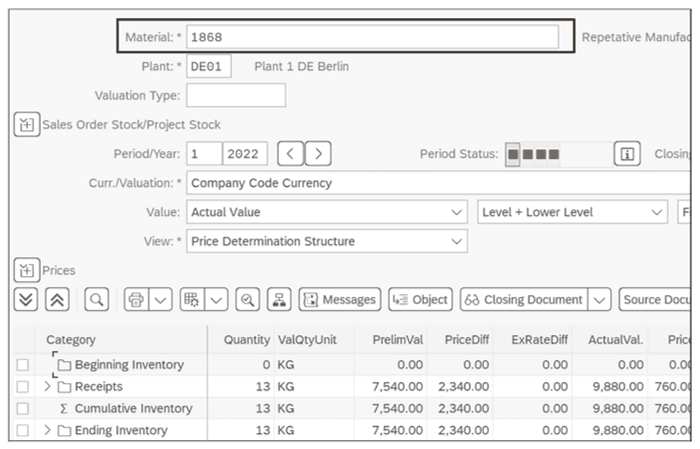
- Allows navigation to other transactions, such as material price analysis for detailed insights.
5. Cost Components:
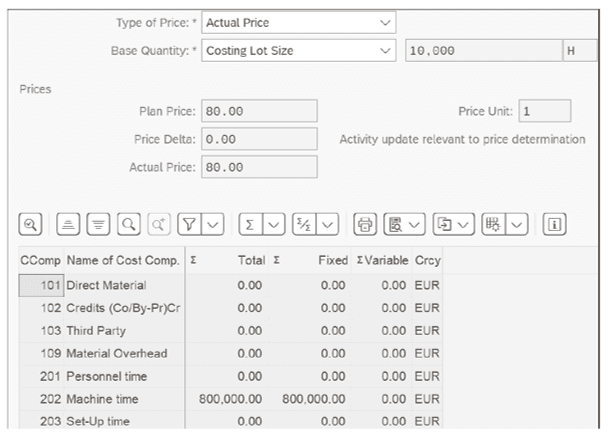
- Clicking on the Cost Component Split button leads to the Cost Components screen.
- Displays the Actual Price split into Fixed and Variable costs for the Machine time cost component.
Understanding activity consumption in SAP S/4HANA provides valuable insights into resource utilization and allows for detailed analysis through interconnected transactions.
Related Insights

Navigate the complexities of SAP Financials with expert insights
By QBS admin • January 31, 2024Learn more

Billing Simplified with SAP Project System in SAP S/ 4HANA
By QBS admin • January 31, 2024Learn more

Mastering SAP S/4HANA Implementation: 5 Golden Rules for Success
By QBS admin • January 31, 2024Learn more